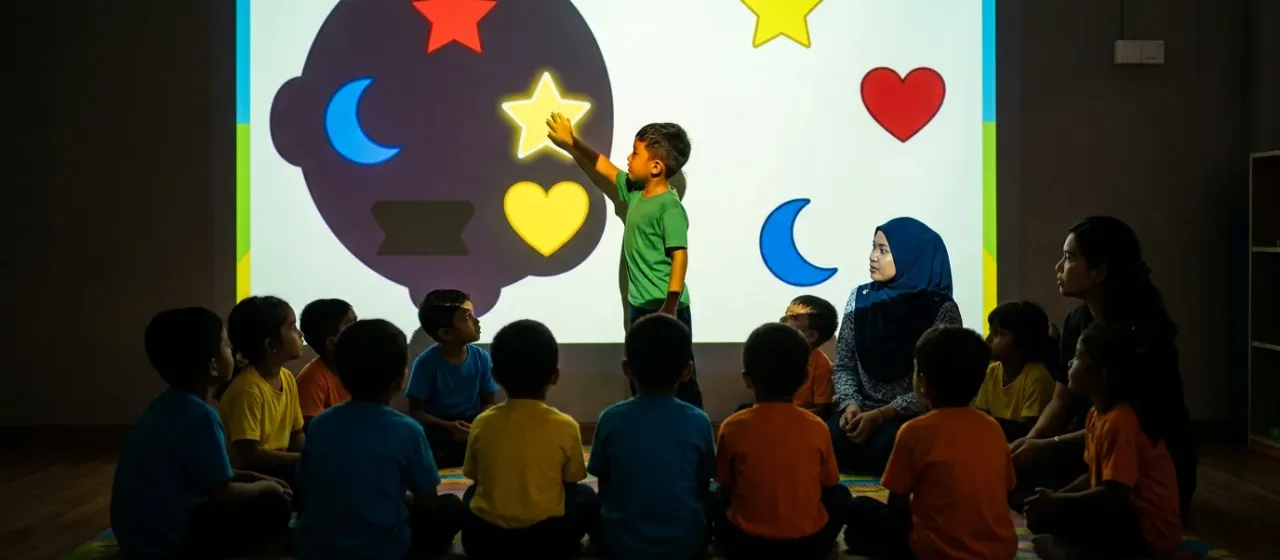
How does the Classroom Projector with Learning Games work?
- Fix the projector to the ceiling or place it on a stand.
- Aim it at a clear classroom wall.
- Open a learning game on the host computer.
- A child walks up and taps a shape, such as a star.
- The shape moves into its slot and the game shows the result.
What comes with the Classroom Projector with Learning Games?
- Projector
- Host computer with learning games installed
What space and power does the Classroom Projector with Learning Games need?
| Play area | A clear classroom wall and floor space for children to sit; confirmed in your quote |
|---|---|
| Mounting height | A normal classroom ceiling, or a stand |
| Power | A standard power point |
| Network | Not needed for lessons; Wi-Fi only when adding new games |
Where is the Classroom Projector with Learning Games used?
Shipping and installation
We ship worldwide from Malaysia. Warranty terms and installation support are confirmed in your quote.
Classroom Projector with Learning Games: questions buyers ask
What do children learn on the Classroom Projector with Learning Games?
The Classroom Projector with Learning Games focuses on matching colours and shapes, using stars, hearts and moons. The games use no written words, so very young children can play.
How do children play the Classroom Projector with Learning Games?
Children play the Classroom Projector with Learning Games by tapping shapes on the wall. The class watches from the floor while one child takes a turn.
Can teachers use the Classroom Projector with Learning Games every day?
Yes, teachers can use the Classroom Projector with Learning Games as a regular activity. It starts from the host computer, so no extra set-up is needed between lessons.
Does the Classroom Projector with Learning Games need a dark room?
The Classroom Projector with Learning Games works well in a dimmed room. Close blinds or curtains to make the picture clearer for the class.