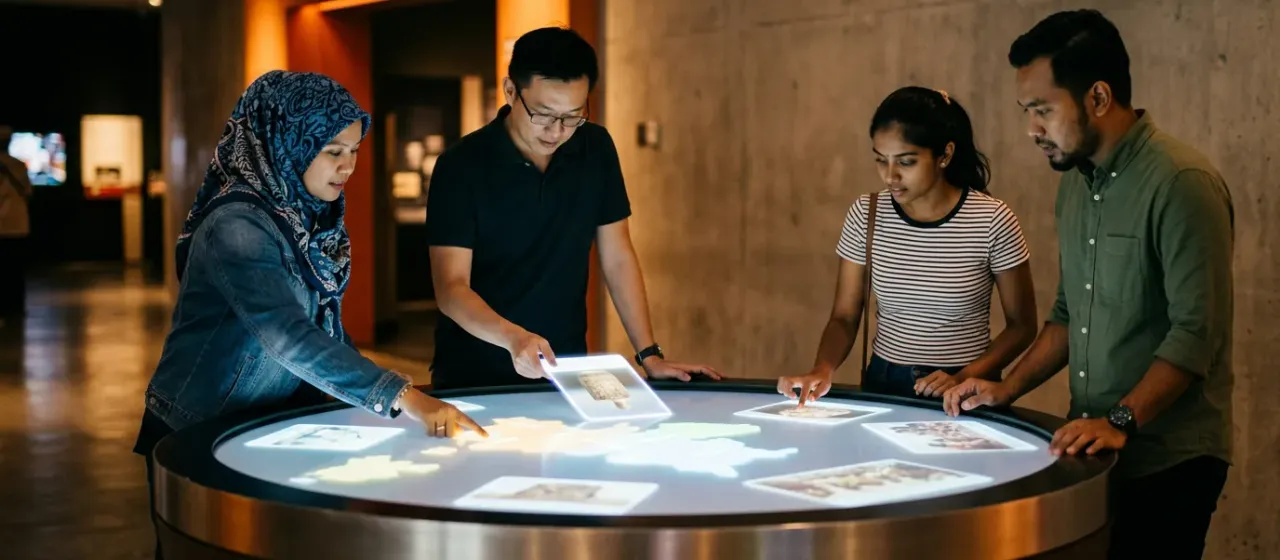
How does the Touch Screen Table work?
- Place the table in an open area where people can walk around it.
- Switch on the screen and load your content.
- Visitors gather on each side of the table.
- Each person taps and drags image cards or a map.
- The table follows every touch at the same time.
What comes with the Touch Screen Table?
- Large horizontal touch screen
- Table frame
- Host computer
What space and power does the Touch Screen Table need?
| Play area | Open floor area with standing room on every side |
|---|---|
| Mounting height | No ceiling requirement; the unit stands on the floor |
| Power | A standard power point or floor outlet |
| Network | Not needed to play; the game runs from the host computer |
Where is the Touch Screen Table used?
Shipping and installation
We ship worldwide from Malaysia. Warranty terms and installation support are confirmed in your quote.
Touch Screen Table: questions buyers ask
How many people can use the multi-touch table together?
Several people can use the Touch Screen Table together because it is a multi-touch design. The final number depends on the table size and the content you choose.
What can visitors do on a multi-touch table?
On the Touch Screen Table, visitors tap and drag image cards, open a map and move items around. Several people can do this side by side without waiting for a turn.
Is the touch table different from the object recognition table?
Yes. The Touch Screen Table reads fingers only, while the Object Recognition Touch Table also reads tokens placed on the screen. Pick the token model for hands-on story displays.
Can the touch screen table go in a lobby with foot traffic?
Yes. The Touch Screen Table suits a museum lobby where people walk up and gather. Leave space around the table so visitors do not block the walkway.